Tag: senior designer

  • Raising the bar for customer-facing support UX

    Raising the bar for customer-facing support UX

    TLDR: An AI-Powered Customer Service Revolution – AI is transforming customer service by offering personalised solutions, and UX plays a crucial role in creating intuitive and engaging CX.

    Revolutionising Customer Service

    AI-Powered Solutions for Financial Institutions

    AI revolutions

    Personalisation

    Discover how AI is transforming customer service in the financial industry. Learn about personalised knowledge bases, integrated chatbots, and unified customer histories that enhance customer satisfaction and operational efficiency.
    To respect confidentiality agreements, the branding and specific naming have been modified. This product is currently live and serving 6k users

    Imagine a world where customer service is not just efficient but truly personalised.

    The Challenge: In today’s fast-paced digital age, financial institutions face the challenge of providing exceptional customer support while maintaining operational efficiency.

    Traditional customer service UX often falls short in meeting the diverse needs and expectations of modern customers.

    The Solution: This case study explores how AI can revolutionise customer service by creating seamless support and behind-the-scenes tools that put people and businesses in control of their money.

    User research and UX Design

    Ability <> Access <> TIME

    Quick

    Facts

    HIstory

    What the product needs to accomplish.

    Evidence informs that Customer Service Representative (CSR) typically operate on multiple panes of glass. Extracting snippets of information to help customers, within the guardrails of their abilities, their access and a timeframe (a phone call). How can this be combined, for the CSR, and potentially for self-serving customers?

    Three persona-types, three outputs;

    1. Mr ‘Self-service’; They need a tool highlighting quick-and-easy answers to their questions, without having to contact a CSR.

    CSR can also provide support and is able to troubleshoot issues and resolve customer problems to deeper issues.

    2. Mrs ‘To-the-point’; Some customers want only the facts, escalating issues to a human CSR when necessary.

    3. Mr ‘Analytical’; CSRs need to have a complete understanding of a customer’s history in order to provide effective support.

    Developing a user centred mode

    To respect confidentiality agreements, the branding and specific naming have been modified. This product is currently live and serving 6k users

    Machine learning

    Self-Service

    knowledge Hub

    Chatbot

    Chatbot

    Personalised recommendations, automating routine tasks, (like FAQs) and predictive analytics are just some of the benefits Machine Learning has in the field of UX Customer Service.

    It was clear for this project there was no one silver bullet. Providing a suite of support from self-service to employing Natural Language Processing (NLP) can all contribute to improving the overall customer experience. Understanding the wealth of possibilities Artificial Intelligence can provide, there was a focussed on three key areas: 

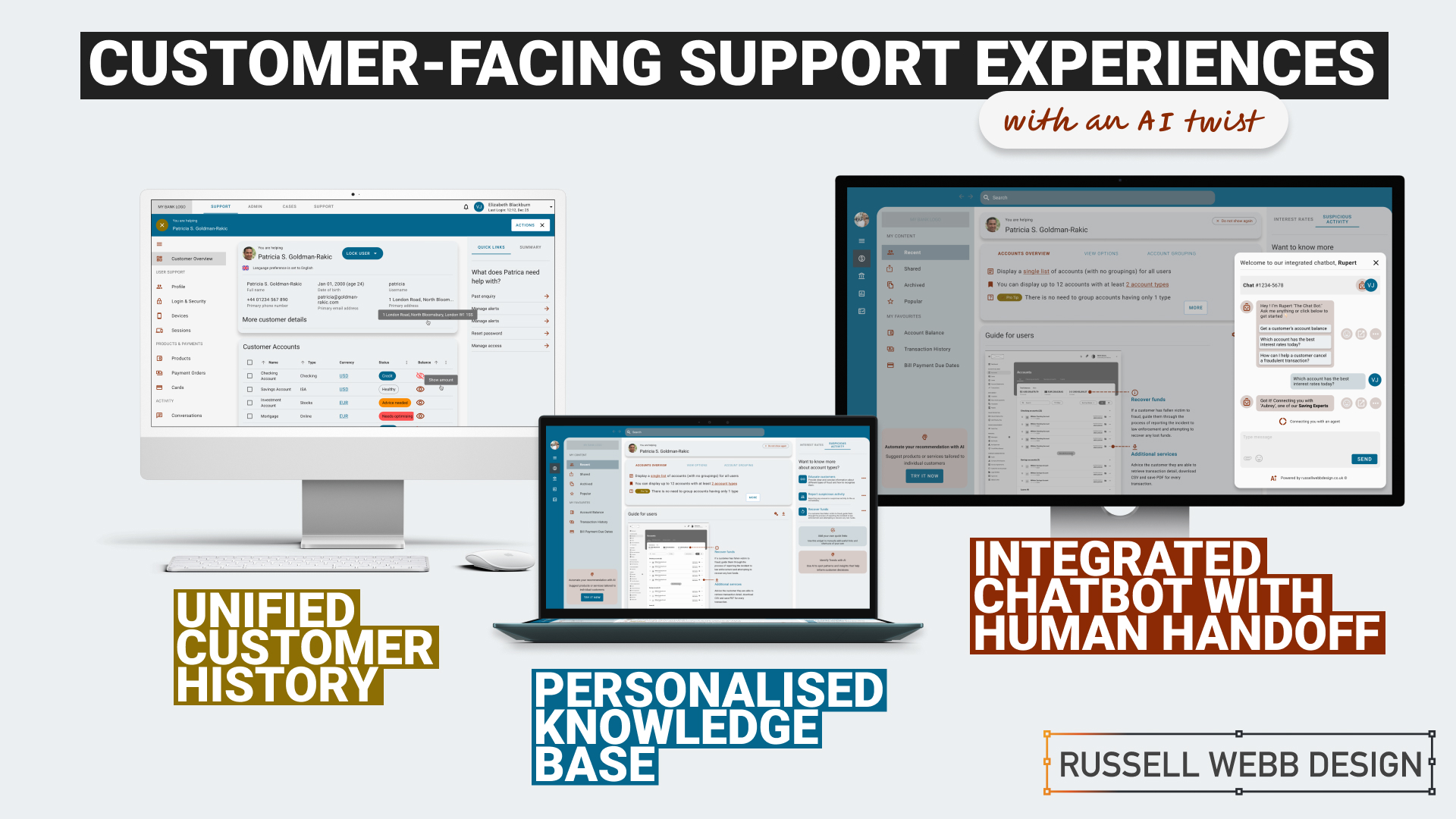
    1. Personalised Knowledge Base

    An AI-powered knowledge base that proactively suggests relevant articles or FAQs based on the customer’s specific query. More about ‘Proactive Suggestion’ later.

    2. Integrated Chatbots with Human Handoff

    Allowing the AI to analyse customer sentiment enables the bot and the CSR to tailor their responses to better meet customer needs and improve satisfaction.

    3. Unified Customer History

    A centralised platform that provides agents with a complete view of a customer’s interactions, including past inquiries, support cases, proactively alerts, and account history.

    History

    Trends

    knowledge Hub

    Proactive Suggestion

    AI can anticipate customer needs and offer solutions before the customer even asks through machine learning algorithms (customer’s history, product information and industry trends ) to predict proactively.

    For example: recommending accessories to recently purchased items, offering troubleshooting tips if a customer has contacted support multiple times, etc. 

    Here the AI recognises this customer has recently been the victim of fraud (see Account Overview note). The right sidebar offers a platform for the UI to proactively generate helpful links to the CSR before they have even asked.


    Self service

    conversational UI

    Unified History

    Process and Impact

    Refined wireframes, optimise self-service and conversational AI

    Starting with several wire-framed directions, then through osmosis filtered down concepts to self-service, a conversational UI and omnichannel integration within the form of a centralised platform. Based on experience and number of assumptions, wireframes were generated to bolster clarification.

    Variants evolved in parallel that merged into a winning model for all three proposals;

    Self Service and Hyper-Personalisation 

    Proactively suggestion, relevant articles and FAQs

    A Personalised Knowledge Base empowers customers to self-serve, with dual-function to help CSR agents to provide targeted support. Aligned to business objectives, these external and internal tools thrive on individual customer data, preferences and behaviour.

    A Personalised Knowledge Base empowers customers to self-serve, with dual-function to help CSR agents to provide support.
    The Customer

    Customers are presented with a user-friendly interface to reduce wait times. Empowered customers can self-serve by searching for documents, tutorials (or anything), related to their query. They have prompted categories to help with Discovery and personalised topics that are trending today. 

    On login, the user is greeted with an app-like interface. This contemporary approach guides them through top-level categories, i.e. Personal and Business finance, then using a navigation as a signpost they are able to drill-down on an Account Overview and User Guide. Tailored topics are surfaced (based on search and account history) within the sidebar quick links.

    The interface has push-points throughout all sections both introduce AI recommendations and provide personalised AI financial insight.

    The CSR

    Using the same B2C interface, CSR agents can access and add-to content, generate most frequently asked self-service tutorials and use the Knowledge Base to improve their own skills.

    Conversational Interface with Human Handoff

    Human-AI Hybrid 

    A smooth transition from AI chatbot, with ‘sentiment analysis’ baked-in, to a human agent 

    An AI chatbot that can handle simple inquiries but seamlessly transitions to a human agent when the conversation becomes complex or requires personalised assistance. This hand-over reduces agent workload for routine queries which improves customer satisfaction with faster responses, but also ensures a smooth transition to human support when needed.

    Chatbot Journey

    From Start through Engagement to Conclusion 

    Natural Language Processing (NLP)

    Gauge customer emotions from an AI-Chatbot that uses sentiment analysis baked-in.

    Properly trained, the AI can recognise the underlying intent behind customer queries, even if expressed differently and provide the right hand-off to the right CSR.

    Unified Customer History

    360˚ View

    A centralised platform | An assistant that proactively spot patterns to anticipate customer needs

    A centralised platform that provides agents with a complete view of a customer’s interactions, including past inquiries, support cases, account history and proactively alerts. For example, if a customer is nearing their contract expiration and has a high purchase frequency, the platform could proactively offer renewal terms or upsell opportunities.

    A single platform to access all customer interaction data: 

    • Reduces the need for customers to repeat information 
    • Enables agents to provide personalised and informed assistance
    • Spot patterns and insights that might inform business decisions
    • Anticipate customer needs and provide timely solutions with proactive support
    To respect confidentiality agreements, the branding and specific naming have been modified. This product is currently live and serving 6k users

    Reduce workload

    Data Insight

    Personalisation

    360˚

    Outcomes, split by discipline

    It is clear that AI enhances personalisation, efficiency, and problem-solving. But how can UX leverage these to create a more human experience.

    Business Outcomes:

    • Operational Efficiency: AI streamlines processes and reduces agent workload.
    • Data-Driven Insights: AI provides valuable customer data for informed decisions.
    • Cost Reduction: AI automates tasks and reduces operational costs.

    UX Outcomes:

    • Personalisation: AI can tailor the Self-Service experience, and brings Hyper-Personalisation to individual needs.
    • Seamlessness: AI integrates chatbots and provides a unified customer view.
    • Proactive Support: AI anticipates customer needs to find answers fast and can provide that 360 view at-a-glance.

    UX & AI | Future-proof partners

    Overall, UX and AI empowers businesses to deliver exceptional customer experiences, improve efficiency, and gain that competitive edge.

    Empowering users with the financial tools they deserve. From Mastering Design Theory and Lean Agile, Solve big problems, fast to How delight and speed are rewriting our UX playbooks. See more Case Studies.

    Empowering users with the financial tools they deserve

    • Mastering Design Theory and Lean Agile
    • Solve big problems, fast.
    • How delight and speed are rewriting our UX playbooks

    More Fintech Case Studies

  • Dashboard UX to Business UI

    Dashboard UX to Business UI

    Enterprise-level, real-time data from multiple sources, instantly accessed, no more hunting.

    A single-source-of-truth of unifying insights speak volumes: 56% iPad growth in just 1.5 years over 100K client meetings

    The Problem Statement

    Problem framing

    Best practices

    Design principles

    To respect confidentiality agreements, the branding and specific naming have been modified. This product is currently live and serving 6k users

    Within a strictly regulated financial environment my clients use dashboards data every day.

    Users

    Advice

    Quotes

    Investment

    As the world’s largest wealth manager, catering to affluent clients requires exclusive online services like advice, quotes and investment strategies, delivered digitally. Internal systems application empower the two principal user groups;

    • Customer Consultant Associates
    • Customer Consultant* (CCA’s/CC’s),

    Assembling these customer meetings takes time, accessing strictly private data to provide a complete, competitive and professional service requires a tailored and specialised tool – of which the Customer Meeting App* is the bank’s primary channel.

    What are the driving factors for developing a dashboard?

    Strategic insights

    Information architecture

    Single source

    Imagine client meetings where crucial information is instantly accessible, scattered data unified, and time spent hunting replaced by strategic insights. This is the potentially transformative power of the Customer Meeting App’s dashboard, built around three “must-have” features:

    1. Single point of access for disparate data
      Instead of opening various applications, interfaces, or online databases, the CCA’s/CC’s have a real-time dashboard.
    2. Broad overview with drill down capabilities
      A dynamic dashboard, digital documentation and secure access.
    3. Easier, faster, sign source of truth
      Consolidated statistic, statues displays, contextual information, and ‘Edit’ functionality placed intelligently for quick consumption.

    Achieving speed, clarity, and brand harmony

    Journey

    Processes

    Re-imagine

    Problem and Opportunity

    The existing offering had become redundant, with processes and previous ways of working no longer relevant or appropriate. The client required the seamless integration of data from third-party repositories and a significantly improved user journey. This presented a clear opportunity to re-imagine the complete ‘Create a Customer Meeting’ user journey.

    Dashboard design best practice

    There are 3 dashboard design principles that are drove decisions and are considered best practice:

    1. Five-second insight

    Funding was a principal driver for this project. Empowering a more intuitive process to adding customer data (account numbers, quote links, investment profile links, and upcoming future services) at a glance was key to the baseline UX.

    2. Inverted pyramid layout

    The inverted triangle displays the most significant insights on the top, trends in the middle, and granular details towards the bottom.

    3. Brand champion and ensure DS achievability

    Championing UCD principles for both organisation’s values and consistency was a challenge. Without a dedicated UX stakeholder, negotiating a new global Design System, within budget and development constraints proved demanding.

    Reimagining Client Meetings

    Scalability

    Visual Hierarchy

    Visual Design

    To respect confidentiality agreements, the branding and specific naming have been modified. This product is currently live and serving 10K plus HNW users.

    To reiterate the design process, I went through the following:

    1. Step 1 – Start with the user needs
      The foundation of successful design. Streamlining the preparation of a meeting, and principally future proofing the Create a Meeting process with a scalable UI that can seamlessly integrate new data repositories, ensuring long-term flexibility.
    2. Step 2 – Segment the experience in to ‘zones’
      The on-screen real estate delivers a quick look experience prioritising top from bottom.
    3. Step 3 – Test and Challenge through Prototyping
      Visualising up to 12 users’ journeys leads for better understanding and smoother development. Developers also need reassurance that this would be a boxed development and will not impact working code.

    Driving Discovery UX within a challenging Agile environment

    Hierarchy

    F-Pattern

    Low-fidelity prototyping

    Early sketches are crucial: They reveal the potential of a dashboard, emphasising hierarchy through top-down, left-to-right user scanning patterns. Grouping key data, utilising white space, and enabling light touch drill-down are key drivers.

    Scope and hierarchy: Initial sketches focus on what’s important, pushing a hierarchical arrangement that guides the user’s eye. Data is prioritised with ‘glance-access’ to preview Meeting Name at the top, followed by Last Modified and owner information.

    Chain of command flow: Expanding on the ‘Mini’ concept, this ‘Maxi’ Dashboard version offers the full experience. Enabling the CCA’s/CC’s to very quickly assess top level meeting status and drill-down to Privacy Setting, customer ID photos, and Mode of Contact.

    Sketching a tailored experience

    What is in scope: These initial sketches start to show the power of a dashboard. Pushing the hierarchical arrangement, the user’s eyes organically concentrate from top to bottom, left to right. We have the data, so embracing the Meeting Name and grouping the Last Modified through to the Meeting Owner data just makes sense.

    Estimation sketches 

    In Agile, pre-estimation is an important ceremony before sprinting. An efficient method of conveying your UI is to sketch and quickly map out the flow, the user interactions and where the final CTAs might be..

    Realising a final solution

    To respect confidentiality agreements, the branding and specific naming have been modified. This product is currently live and serving 6k users

    A conceptual dashboard with multiple layers.

    The final solution solved both the scalability problem, providing easy access to account numbers, the ability to add other account numbers, visibility on the meeting date and time, and the meeting status and who is the meeting organiser, all there front-of-stall for the user. Complete transparency on meeting detail, including location, meeting language an whether the meeting has typed notes and freehand notes plus special features including packaging the meeting contents ready to send the customer and associating the meeting with a customer ID.

    A new dashboard suite is here;

    • Highly Readable
    • Inherently Scalable
    • Data-Driven

    Design Trade-Offs

    Business Reality

    ROI

    Inverted Pyramid

    One key factor in the development (and acceptance) of this new radical design was ‘achievability’. Funding in a key developmental constraint with financial services, without it a project will not leave the ground – designing with business realities is a UX key skill. 

    Account number drill-down

    The UX was sold into the business as streamlining the ‘Create a Meeting’ user flow at a single glance, adding value at the advisory level.

    There are four (4) account numbers associated with this meeting. The user is able to hover, edit or launch a pop-over dialog box to create an account specific meeting from this functionality.

    Hierarchical details

    Providing a tiered ‘inverted triangle’ proved to be an excellent facilitator for the single-point of truth concept. Employing hover state ‘tooltip’ functionality allowed for a broad overview with drill-down capabilities.

    Global Digital Shift

    Adoption

    Impact

    Massive UX Reach

    To respect confidentiality agreements, the branding and specific naming have been modified. This product is currently live and serving 6k users

    40

    Countries

    190

    Offices

    100k

    100,000 Meetings

    48%

    8% to 56% Worldwide Growth

    The bank is present in more than 40 countries with approximately half of their 190 offices are in western Europe, where half of the Customer Meeting App meetings are delivered on the iPad. This is a phenomenal growth from 8% to 56% worldwide in the last 18 months.

    100,000 meetings prepared and delivered via the application each year. A true revolution!

    *Names changed to protect the innocent

  • UX Case Studies prepared for Avaloq

    UX Case Studies prepared for Avaloq

    Successful UX Design Projects

    My Top 3 UX Design Case Studies prepared for Avaloq

    I have prepared a selection of UX design projects focused on challenges, solutions, and lessons learnt within the financial landscape.

    2024 is my action year – Can I apply these lessons to any of your teams or projects?

    Case Studies

    • Real-World Messiness of Product Design

      Real-World Messiness of Product Design

      “T-shaped” expertise in Fintech, complex UX problem-solving, and commercially-minded design.

    • Raising the bar for customer-facing support UX

      Raising the bar for customer-facing support UX

      AI-Powered Customer Service Revolution – AI is transforming customer service by offering personalised solutions, and UX plays a crucial role in creating intuitive and engaging customer experiences. By leveraging AI and focusing on UX, businesses can create a more personalised, efficient, and satisfying customer experience.

    • A Frictionless Wireframe Onboarding Journey

      A Frictionless Wireframe Onboarding Journey

      Ditch the wireframes rock stories. Customers faced a confusing onboarding maze. Detailed UX wireframes transformed it into a frictionless journey, building trust and getting users invested. Clarity led to confidence and the winning play, a clear, secure, and personalised onboarding process building loyalty from the first click.

    • Using proto-personas to Know your user – Pt I

      Using proto-personas to Know your user – Pt I

      Despite resource limitations, this Content Audit project successfully utilised proto-personas to gain a deeper understanding of user needs. By consolidating and refining persona data into meaningful ‘chunks’, and effectively communicating findings to stakeholders, all lead to a deeper comprehension of users for all involved. This empowered us to move forward with the next stage –…

    • Discovery Workshop to Roadmap in 3 days

      Discovery Workshop to Roadmap in 3 days

      How to facilitate an ideation workshop around solving problems, understanding through ideation, knowledge sharing (based on agreed on personas) and then attributing those personas, via SMEs validation, to surfacing UI to promote next steps plotted on a goal-oriented roadmap.

    • Power up your designs with dark mode trend front-of-mind

      Power up your designs with dark mode trend front-of-mind

      How to design with the 2023 dark mode trend front-of-mind. Delight, speed and satisfaction are rewriting our UX playbooks in finance. A modern-day UX-er has rapidly emerged, changing the rules of the game. Part of that skill-set is the new must-have which is dark mode.

    • Pt I – Money Management App UX Challenges Explained

      Pt I – Money Management App UX Challenges Explained

      A two-part deep-dive focussing on mobile UX design targeting seasoned designer-types, mastering Design Theory, and navigating lean Agile challenges.

    • What is the role of open banking in the super app evolution?

      What is the role of open banking in the super app evolution?

      TL;DR Open Banking unlocks a future where financial apps become indispensable partners, not just tools. A shift in the balance of power, more convenience, better financial education and more meaningful relationships with users. What’s next in this ecosystem; financial freedom, bulletproof investment flows, AI…

    • Using Experience Maps to uncover user behaviour Pt II

      Using Experience Maps to uncover user behaviour Pt II

      Crafting an unforgettable investment experience within the intricate world of investor behaviour unveiled a tapestry of needs and motivations that shape financial decisions. Using Experience Mapping these insights into the customer lifecycle were uncovered and common threads exposed.

    I am available now!

    Please continue to browse to see more challenges, solutions, and lessons learnt within the fintech landscape (and others)

    Get in touch

    15 Years Experience | Workshop Wizard | Design System Ninja
    Finance | Gambling | Healthcare | Recruitment

    Say hello

    Email

    I am frequently online so will always get back you


    info@russellwebbdesign.co.uk

    Let’s connect

    LinkedIn

    Please review my profile to connect


    linkedin.com/in/webbrussell

    Download and keep

    CV
    Russell Webb is a User experience Designer who digs deeper when implementing Design Systems, who facilitates workshops with local building societies up to asset managers behemoth and who builds design teams by sharing best practice and mentoring through the stack.

    Workshops to stakeholder mngt and much more


    Or just leave a comment below.

  • How user personas can help crystallise the early stage design process

    TL;DR; A large automotive client wanted to improve their dealer portal but the client needed guidance on understanding their audience’s needs and wants. Personas generation is a great to focus the team’s expectations and contributes to a better product and service.

    B2B UX Case Study – Automotive Dealer Portal

    I was recently asked to provide insight for a dealer portal for a very large automotive client. There was a definite opportunity in their market to improve their internal front end offering – but very early on it was clear there was a lack of understanding of who their audience was. How their needs and wants differed and what, as customers, they were looking for.

    So, before deep-diving in the UX,  I produced a selection of personas to focus down the teams expectations and unite the groups thinking. I’m taking for granted that we are all aware that personas represent a typical user, based on user research and incorporate user goals, needs, and interests. Here I created four (4) personas, Hilary, Gary, Donald and Bernie;

    1.1 – Hillary, a Competitive Owner / Consider

    "“My
    (more…)
  • Our vision for Shopping on Mobile Web

    TLDR: El Corte Inglés, a retail giant, needs a mobile app refresh to captivate customers and boost sales. Create a seamless shopping experience with: intuitive navigation, media-rich content, that is mobile-optimised Features and has a streamlined checkout to transform their UX into a powerful sales driver.

    Contents

    Coverpage

    Overview

    El Corte Inglés S.A. (English: The English Cut as in tailor’s cut), headquartered in Madrid, is the biggest department store group in Europe and ranks 4 worldwide. El Corte Inglés is Spain’s only remaining department store chain, as well as owner of several associated businesses, such as supermarket chains Hipercor, Supercor & Opencor, fashion chain Sfera as well as a travel agency (Viajes El Corte Ingles) and telephone provider (Telecor).

    Brief

    Incorporating a nav search, a store finder with the traditional basket top right design a media rich experience for shopping on  your phone. By captivating a customer and therefore increasing spend, design a system of sub navigation that is convincing and compelling. Drilling deeper into the experience, screens can display products with the the added mobile features of sort and zoom.  Product Info and descriptions, including ‘Add to Basket’ and ‘Wish List’ functionality plus the ability to share your purchase are all important consideration.

  • UK Household Retail Co – iPhone and Mobile Web Concepts

    TLDR: Propose an approach fro the The White Company to stay ahead of the curve and deliver an exceptional mobile shopping experience that aligns with their brand values.

    Insight

    In spite of its rapid growth, The White Company retains a firm grasp of its core values, identity and philosophy. It is consistently committed to supplying impeccably designed products that are of the finest quality and at outstanding value for money. In addition, levels of service (across every channel) are constantly monitored to provide a shopping experience that is second to none.

    This insight was taken to the next level with a series of inspirational iPhone App screen and Mobile Web visuals that formed part of a presentation on what these new channels can do you this business.

    * Please note

    These screens are just an indication of what we could do for you. Moving forward and after full scope many other options are available.

    ReferenceIntro pages

    (more…)